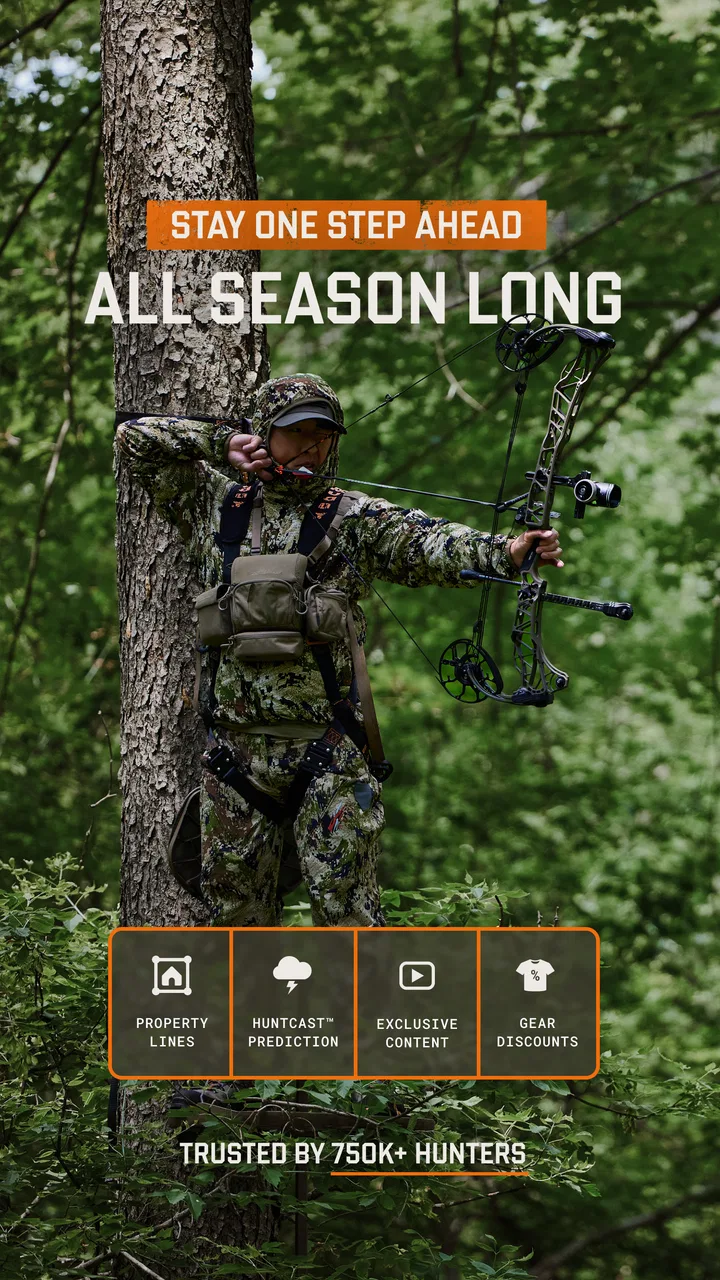
HuntWise: A Better Hunting App
- 4.2
- Rating
- 1.00M
- Installs
- Free
- Price

 Analysis by App-foxy
I approach hunting apps with a little caution. A tool that uses location, weather, mapping, and personal planning information can be genuinely useful, but it also deserves a closer look than a simple weather widget. After spending time with HuntWise, I found a focused sports app for hunters who want to bring several parts of a trip into one place instead of switching between a forecast, a map, a notes app, and a separate GPS tool.
The basic appeal is easy to understand: it combines hunting-time guidance, location planning, custom waypoints, weather information, and navigation. That combination makes it more practical than a general outdoor app when the activity is specifically hunting. At the same time, I would not treat its recommendations as a substitute for local knowledge, legal preparation, or careful field judgment. Its strongest role is as a planning companion.
Developed by Sportsman Tracker, Inc., this free sports app has built a sizeable audience, with over one million installs and an average rating of 4.2 from around 8.5 thousand ratings. It is suitable for Everyone, runs on Android from version 8.0 onward, and the current release is 8.3.7. Those details make it accessible to many users, although the optional purchases, which range from $0.99 to $119.99 per item, mean that “free” should be understood as an entry point rather than a promise that every part of the experience costs nothing.
You May Also Like

 Blood Strike: 2.5 Anniversary
Blood Strike’s Loadouts Turn Every Drop Into a Tactical Gamble
A close look at Blood Strike’s custom loadouts: how fast access to signature weapons reshapes its battle royale rhythm, rewards preparation, and narrows the gap between fights.

 Pandora - Music & Podcasts
Pandora’s Music Is Easy to Start, but Harder to Recover
Pandora’s strength is its low-effort path from a seed to a station. Its weak spot is how much confidence it asks you to place in connection, setup, and quiet recovery.

 8 Ball Pool
 Is Built on Rivalries, Rematches, and Routine
A close look at the rivalries, rematches, shared routines, and unanswered safety questions that turn a quick pool match into a persistent mobile community.

 Samsung Music
’s Quiet Strength Is Playing What You Already Own
Its reach comes less from spectacle than from dependable access to a personal library. That simplicity is both the app’s strongest retention engine and its ceiling.

 AccuWeather: Weather Radar
AccuWeather Review: A Quick, Clear Forecast for Everyday Decisions
For everyday plans, the best forecast is the one you can understand quickly. AccuWeather makes rain timing, radar, and local conditions easy to act on, with a few trade-offs.

 Hill Climb Racing
Why Hill Climb Racing Still Turns Crashes Into One More Run
A tiny car, a bumpy hill and one more upgrade: Hill Climb Racing keeps resurfacing because its simple chaos makes every near-miss feel personal.
More From Our News Desk



What I looked for before trusting it in the field
Before I relied on any hunting app outdoors, I wanted to know how its map, timing guidance, and weather information fit together—and where my own judgment still had to lead. I also paid attention to the small habits that make a location-based tool useful without making it the only plan I trust. That practical lens is what I bring to the sections that follow.
A useful hunting dashboard, not an automatic decision-maker
The first thing I noticed is that the app makes more sense when used before leaving home. Hunting conditions are rarely determined by one number. Wind, changing weather, time of day, access routes, and the exact location all affect how useful a plan will be. HuntWise brings those considerations closer together, which saves time during preparation.
I especially like the idea of building a trip around custom waypoints rather than relying only on a general map. A waypoint can represent a stand, a trail crossing, a parking place, a water source, or a boundary that matters to the day’s plan. The practical advantage is not merely marking a point; it is creating a personal reference system that reflects how I actually think about a property.
That personal layer is where the app feels more valuable than a standard weather service. A normal forecast can tell me what the sky may do, while a generic navigation app can help me reach an area. HuntWise is aimed at connecting those facts to a hunting plan. I still need to interpret the information, but I spend less time assembling it manually.
Why location deserves deliberate handling
Any app built around GPS navigation and custom outdoor locations should be used thoughtfully. A hunting map can contain information I would not want casually exposed on a shared device or account. For that reason, I would avoid creating sensitive waypoints while sitting in a public place, and I would review the app’s visible account and privacy choices before saving locations that matter to me.
I also recommend separating convenience from dependence. I would not make the app my only way to find a vehicle, return to a trailhead, or understand an unfamiliar area. Battery life, signal conditions, weather, and simple human error can all turn a digital plan into a weak plan. I would keep the relevant offline or physical backup that I normally use for outdoor trips, even when the app is working well.
This is not a criticism unique to HuntWise; it is a sensible boundary for any location-centered hunting tool. The important point is that its value increases when I use it as one layer of preparation, not as permission to ignore navigation basics.
Permissions and visible choices matter more than promises
My trust in an app like this comes from what I can see and control, not from assuming that a polished interface tells the whole story. Before using GPS-related functions, I would check the operating system’s permission prompts and grant access only in the way that matches my needs. If I am planning at home, I may not need the same location access that I would want while navigating outdoors.
I would also look through the account area for sign-in, subscription, purchase, and notification controls. This is particularly important because the app contains optional in-app purchases. A free download can still lead to purchase decisions, so I prefer to know which features are included, which require payment, and how the platform handles confirmation before I explore deeply.
The app’s age rating of Everyone makes it broadly approachable, but that does not remove the need for adult judgment around location sharing, purchases, and outdoor safety. An age label describes suitability; it does not replace checking the choices presented on the device.
Where the app can save real time
A realistic use case is a weekend morning when I have limited time to prepare. Instead of opening several apps, I can review the weather, examine the areas I have marked, consider the suggested hunting periods, and use navigation to organize the route. The benefit is not that HuntWise magically finds a perfect decision. The benefit is that it reduces the number of disconnected steps between “I might go hunting” and “I have a workable plan.”
Another useful workflow is reviewing a property after several visits. I can keep meaningful points together rather than scattering them across screenshots, handwritten notes, and unrelated map pins. That makes the app more useful over time, especially for someone who revisits the same areas and wants a consistent planning habit.
My advice is to name waypoints in a way that will still make sense later. A label such as “north approach” or “vehicle access” is more useful than a vague personal abbreviation when I am tired, moving quickly, or reviewing the map weeks after creating it. This is a small habit, but it turns a map from a collection of dots into a practical field reference.
Weather information needs interpretation
Weather is one of the app’s most attractive elements, but it is also an area where overconfidence can cause problems. Forecasts change, local conditions vary, and a prediction that looks favorable on a phone may not describe a sheltered hollow, exposed ridge, or dense woodland accurately. I would use the weather view to compare possibilities and prepare clothing and routes, not to guarantee animal movement.
The same caution applies to the app’s hunting-time guidance. A favorable period can help me decide when to focus my attention, but it should not override local regulations, land access rules, visibility concerns, or what I observe on site. The guidance is most useful as a planning signal. It becomes less useful when treated as a command.
One practical habit is to check the forecast at more than one point in the day rather than making a single decision the night before. If conditions shift, I can adjust the route, the equipment, or the length of the outing. HuntWise can make that review easier, but the responsibility for interpreting the change remains mine.
How it compares with the usual alternatives
Compared with a general mapping app, HuntWise is more specialized because its purpose is connected to hunting periods, outdoor conditions, and personal waypoints. A standard map may be better for broad travel, street directions, or sharing a route with someone who does not hunt. HuntWise is more relevant when the map is part of a hunting plan rather than simply a way to reach an address.
Compared with a standalone weather app, it offers a more activity-specific context. A weather app may provide a deeper forecast interface or broader everyday coverage, while HuntWise is more convenient when I want weather alongside hunting-oriented planning. I would still keep a familiar weather source available if precise local forecasting is especially important for a trip.
Compared with paper maps and notes, the app is easier to update and can keep several types of planning information close together. Paper remains valuable as a backup because it does not depend on battery power or an app session. For me, the best arrangement is not either-or: digital planning for convenience, plus a simple backup for resilience.
Where friction can appear
The app is not equally useful for every hunter. Someone who already has a trusted mapping routine, detailed local knowledge, and a separate weather workflow may find the combined approach unnecessary. If I only need occasional directions or a basic forecast, a general-purpose app may be simpler and less demanding.
The optional purchase structure is another point to consider. Because individual items can cost from $0.99 up to $119.99, I would not assume that the free installation gives me the complete experience. I would first identify the functions I actually need and check the purchase screen carefully before committing. That is especially important for a seasonal user who may not use advanced tools often enough to justify a large expense.
There is also a learning curve in making the app useful. A blank map does not become valuable until I add sensible waypoints and develop a routine for checking conditions. Users who expect instant, perfectly tailored advice may be disappointed. The app rewards preparation more than passive browsing.
Data-sensitive moments I would handle carefully
The most sensitive moments are obvious: creating precise location markers, using navigation in the field, signing into an account, and making an in-app purchase. I would pause at each of those points and confirm that the action is appropriate for the device and situation. I would not leave a hunting map open on a shared phone, and I would avoid sending screenshots that reveal more location detail than necessary.
I would also review notification settings. Timely reminders can be useful, but too many alerts can become distracting, particularly when I am trying to stay quiet or focused outdoors. Turning off anything I do not need is a simple way to keep the app working for me rather than competing for attention.
When changing phones or accounts, I would take a moment to understand what happens to saved waypoints and other planning information before relying on them for an important trip. That is a general account-control habit, but it matters more when the information represents private places or carefully built routines.
Who should use it, and who should skip it
I think HuntWise is a good fit for hunters who want one hunting-focused workspace for weather checks, timing guidance, location markers, and navigation. It is particularly appealing if I regularly revisit properties, like organizing trips digitally, or find myself jumping between several ordinary apps before leaving home.
I would recommend it less strongly to someone who wants a purely offline solution, dislikes account-based tools, or has no interest in saving custom locations. It may also be the wrong choice for a person who expects a forecast or activity indicator to make decisions automatically. The app can support judgment, but it cannot replace knowledge of the land, safety preparation, or compliance with local rules.
New users should begin with a low-stakes planning session rather than testing every function during an important hunt. Mark a few familiar points, compare the weather information with the source already trusted, inspect the navigation behavior, and learn where purchase and account controls appear. That approach reveals whether the workflow fits without putting a real trip at risk.
My cautious verdict
HuntWise succeeds because it addresses a real planning problem: hunting information is often spread across too many unrelated tools. Its combination of custom waypoints, weather, navigation, and hunting-time guidance can make preparation clearer and more efficient. I found the strongest value in the way it helps turn scattered observations into a repeatable routine.
Still, I would judge it by control and context rather than by convenience alone. Location information should be handled deliberately, optional purchases should be understood before buying, and every recommendation should be treated as guidance rather than certainty. Keeping a backup navigation method is sensible, especially for remote trips.
With those boundaries in place, I can recommend it to the hunter who wants a specialized digital companion and is willing to do a little setup. The free starting point makes it easy to explore, while the current version 8.3.7 shows that the app remains actively presented as a modern tool. My final view is positive but measured: use HuntWise to organize better, not to surrender your own judgment.
FAQs for HuntWise: A Better Hunting App
01What features does HuntWise offer to enhance my hunting experience?
HuntWise provides a comprehensive suite of features designed to enhance your hunting experience. Key features include advanced mapping tools, weather forecasts, solunar calendars, and detailed property boundaries. The app also offers animal activity predictions and social networking capabilities to connect with other hunters. These tools help in planning hunts more effectively and increasing success rates.
02Is HuntWise suitable for beginners, or is it more targeted towards experienced hunters?
HuntWise is designed to cater to both beginners and seasoned hunters. The user-friendly interface and comprehensive guides make it easy for newcomers to get started, while the advanced tools and custom settings offer depth for experienced hunters. Whether you're just starting out or looking to refine your skills, HuntWise has something to offer.
03Does HuntWise require a subscription, or is it free to use?
HuntWise offers both free and premium subscription options. The free version provides basic features, while the premium subscription, called HuntWise Pro, unlocks advanced tools like high-resolution maps, real-time weather updates, and expert hunting forecasts. Users can choose a plan based on their needs and budget, with monthly or yearly payment options available.
04How accurate are the animal activity predictions in HuntWise?
The animal activity predictions in HuntWise are based on a combination of solunar data, weather patterns, and user-reported sightings. While these predictions are formulated using sophisticated algorithms and data analysis, they are estimates and not guaranteed. However, many users find them to be a valuable tool in planning successful hunts.
05Can I use HuntWise offline, or does it require a constant internet connection?
HuntWise offers offline capabilities for certain features, such as downloaded maps, which can be accessed without an internet connection. However, some features, like real-time weather updates and social networking, require connectivity. It's advisable to download necessary data before heading out to areas with limited service to ensure uninterrupted use.
Pros
- Comprehensive hunting maps available.
- Weather forecasts tailored to hunters.
- Animal activity predictions improve planning.
- User-friendly interface for easy navigation.
- Community feature for sharing tips and photos.
Cons
- Requires subscription for full features.
- Offline maps need prior download.
- Battery drain with continuous GPS use.
- Limited animal tracking in some regions.
- Occasional app crashes reported by users.

HuntWise: A Better Hunting App
Gallery